1. Green provides the brand reference
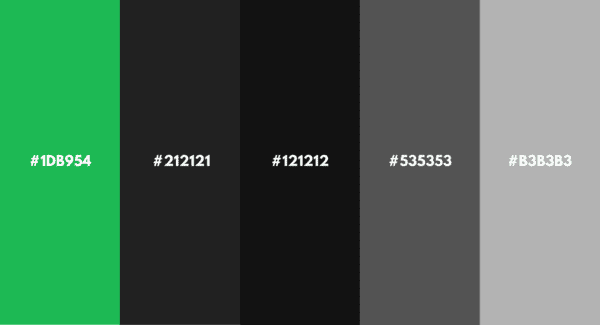
Spotify’s green logo gives the service a consistent visual marker among changing artists, playlists and cover images. Its design and branding guidelines describe green, black and white logo treatments and the backgrounds on which they should appear.
For a general color study, our Spotify color palette offers swatches to compare. Use the supplied official assets for a Spotify integration rather than selecting a nearby green from a screenshot. Screenshots can capture a hover state, a different display profile or artwork that has nothing to do with the logo.
2. Artwork introduces a wider palette
Album and playlist images can make one view feel warm and another cool. Artwork-led background treatments extend that color beyond the square cover, while dark surfaces leave space for the image and track information.
A bright cover can dominate a small screen. Leaving the surrounding controls restrained gives the artwork room without making every button compete for attention.
3. Listeners can design playlist covers
Spotify’s cover-art tools let listeners add their own visual direction to a playlist. Its 2024 launch announcement introduced a mobile beta for Free and Premium users with images, colors, text effects and graphic elements. The current cover instructions explain the supported editing options.
- Start with the image: choose a crop that still reads as a small square.
- Keep a short title clear of the busiest area. Check your Spotify playlist image size before exporting the cover.
- Try one background color before adding several effects.
A playlist cover does not have to explain every song. Sometimes one good image does more than a paragraph squeezed into a thumbnail.
4. Neutral surfaces support readable controls
Dark backgrounds and lighter text can separate track details from colorful artwork. Small changes in gray also distinguish surfaces without giving every panel a new hue.
Check the actual text and background pair rather than assuming a dark interface always passes. The color contrast checker can help with that pair. A background that changes with artwork needs to remain readable across its different colors; one fixed ratio cannot describe every Spotify screen.
5. Wrapped uses color for a particular story
Audio Aura was part of 2021 Wrapped. Spotify Engineering’s account of the feature describes grouping track mood descriptors and selecting two leading mood categories for a listener. The resulting visual combined an animated gradient, ribbons and blur.
In that campaign, colors such as Purple and Yellow belonged to a designed mood story. They were not a universal personality test or a permanent setting that recolored the whole app.
Where Spotify Palette fits
Spotify Palette by Israel Medina is an independent project. Its creator describes generating palettes from a user’s top tracks over the previous six months, using danceability, valence and energy.
| Name | What it refers to | Color’s role |
|---|---|---|
| Spotify branding | The service’s visual identity | A recognizable logo treatment |
| Playlist cover editor | A Spotify editing feature | Listener-selected artwork and effects |
| 2021 Audio Aura | A specific Wrapped story | Two mood-led colors in a campaign visual |
| Spotify Palette | An independent project | A listening-history color interpretation |
For a color study, compare the broad background with the small accents first. A cover, a logo and a playback control do different jobs even when all three happen to use green.