What makes a color primary?
A primary color is one of the starting colors in a particular mixing system. There is no single trio for every medium. The dictionary definition of a primary color introduces the idea. The model tells you which colors belong in that set.
Adobe’s primary-color guide separates the traditional red–yellow–blue model from the systems used for screens and printing.
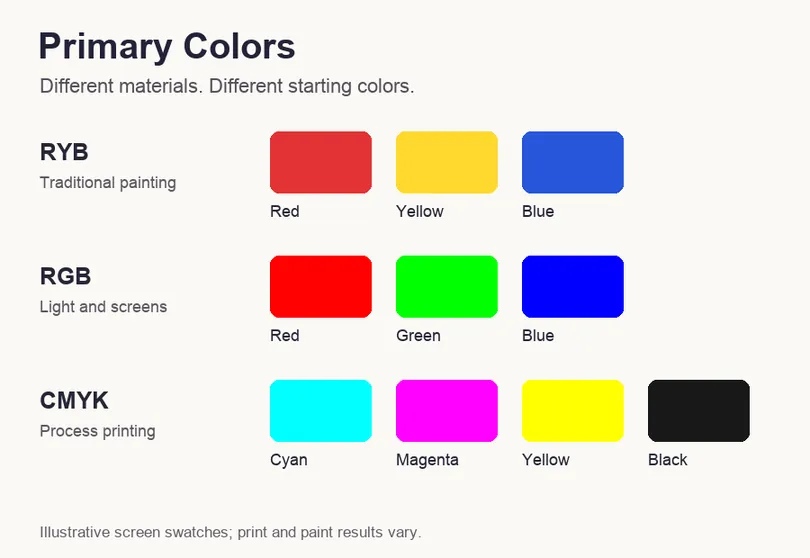
| Model | Starting colors | Where it fits | What mixing does |
|---|---|---|---|
| RYB | Red, yellow, blue | Traditional art teaching | Pigments absorb light; results depend on the paints. |
| RGB | Red, green, blue | Screens and colored light | Adding light makes brighter mixtures; all three at full intensity give white. |
| CMYK | Cyan, magenta, yellow, plus black | Process printing | Inks absorb light reflected from the paper. |
RYB: the familiar paint-box model
In traditional RYB teaching, red and yellow make orange, yellow and blue make green, and blue and red make violet. With real paint, the pigment matters. Two tubes both labeled blue can produce different greens when mixed with the same yellow.
Think of the wheel as a guide, not a recipe book. Test a small dab before mixing enough paint for the whole background. The Colour Literacy Project explains why no limited primary set can reproduce every visible color.
RGB: red and green light make yellow
RGB adds light. Red plus green gives yellow, green plus blue gives cyan, and blue plus red gives magenta. Combining all three at full intensity produces white. These are light mixtures, so a red-and-green paint experiment will give a very different result.
For web work, the sRGB channel endpoints are red #FF0000, green #00FF00 and blue #0000FF. Adobe’s color-model explanation distinguishes the RGB model from individual color spaces such as sRGB.
.webp)
The swatches above are a red, blue and green palette. Their near-primary HEX values are separate from the exact sRGB endpoints listed earlier.
CMYK: ink on paper
Process printing uses cyan, magenta and yellow with a separate black ink, the K in CMYK. Ink absorbs part of the light that would otherwise reflect from the paper. More ink generally darkens the result, unlike adding light on a screen.
Paper and ink profiles affect the finished print. For a brochure or poster, ask the printer which profile and file settings they need. Our guide to CMYK colors and ink values goes further into that workflow.
Using red, yellow and blue in a design
A red, yellow and blue palette can feel bold and playful. It does not need equal amounts of all three colors. A small red detail can sit beside a larger blue area, with yellow reserved for one bright accent.
- Blue: compare a pale background with a deep blue button. The text color will need to suit each surface.
- Red: a warning label draws on a familiar convention. On a celebration card, the same hue has a different role.
- Yellow: try dark lettering on a light yellow field. The Yellow examples show how much the surrounding tones can change.
Color associations also have a cultural side. Roman mythology connects the god of war with the name Mars. A warning sign and a celebration card can use the same red for very different reasons.
Try a small palette first
If you are picking colors from scratch, start with a background, a text color and one accent. Place them around a real heading or button. Use the color contrast checker on the text-background pair before choosing the final shades.
More combinations can help when the first version feels too bright or too quiet. Adjusting the color tones may be enough; you do not always need another hue.